
- Published on
- •8 min read
The N+1 Query Problem: Death by a Thousand Round Trips
- Authors

- Name
- David Manufor
- @davemanufor
We’ve all been there: you push a new page, notice it’s dragging, and immediately jump into the frontend codebase. You memoize components, audit your bundle sizes, and compress images. But the page still takes four seconds to load.
It’s only when you open your database metrics that you see the real culprit: a massive cascade of tiny queries, each one waiting politely for its turn. Hundreds of them.
That’s the classic N+1 query problem—and it’s one of the most common ways database layers silently choke application performance.
It’s a particularly sneaky issue because it doesn’t look like a bug. Your application logic is clean, your variable names are sensible, and your ORM is doing exactly what you told it to do. But you’ve accidentally instructed it to be as inefficient as possible, and it has happily obliged.
The Problem, in Human Terms
Before we dive into code, let me paint a picture.
Imagine you’re at a restaurant. You sit down with five friends and the waiter comes over. Instead of asking the table for everyone’s order at once, this waiter takes your order, walks to the kitchen, comes back, takes the next person’s order, walks to the kitchen again, comes back, and so on. Six trips to the kitchen for six orders.
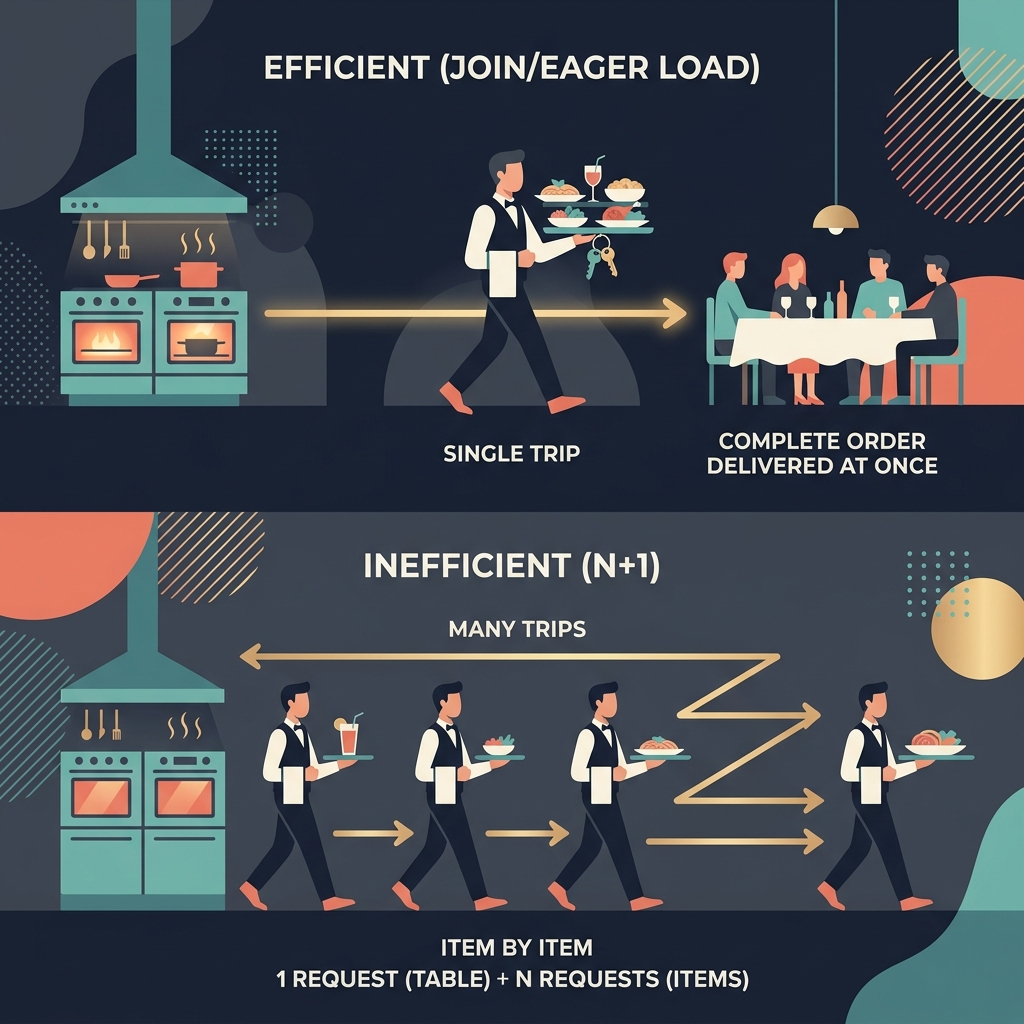
That’s an N+1 query. One trip to figure out who’s at the table (the initial query), then N individual trips for each person’s order (the follow-up queries). The waiter is technically doing their job. But the restaurant is crawling.
A sensible waiter takes everyone’s order in one go. One trip. Done. That’s a JOIN. That’s eager loading. That’s what your database is capable of — if you let it.
What It Actually Looks Like
Let’s say you’re building a blog (I know a thing or two about that) and you want to display a list of posts with their authors.
Here’s the innocent-looking code that starts the fire:
// Fetch all posts
const posts = await db.query('SELECT * FROM posts')

// For each post, fetch its author
for (const post of posts) {
  // Most Node.js database drivers (like pg or mysql2) return an array of row results
  const [author] = await db.query('SELECT * FROM users WHERE id = ? LIMIT 1', [post.author_id])
  post.author = author
}
Looks clean, right? It works. It’s readable. It’s also catastrophically slow at scale.
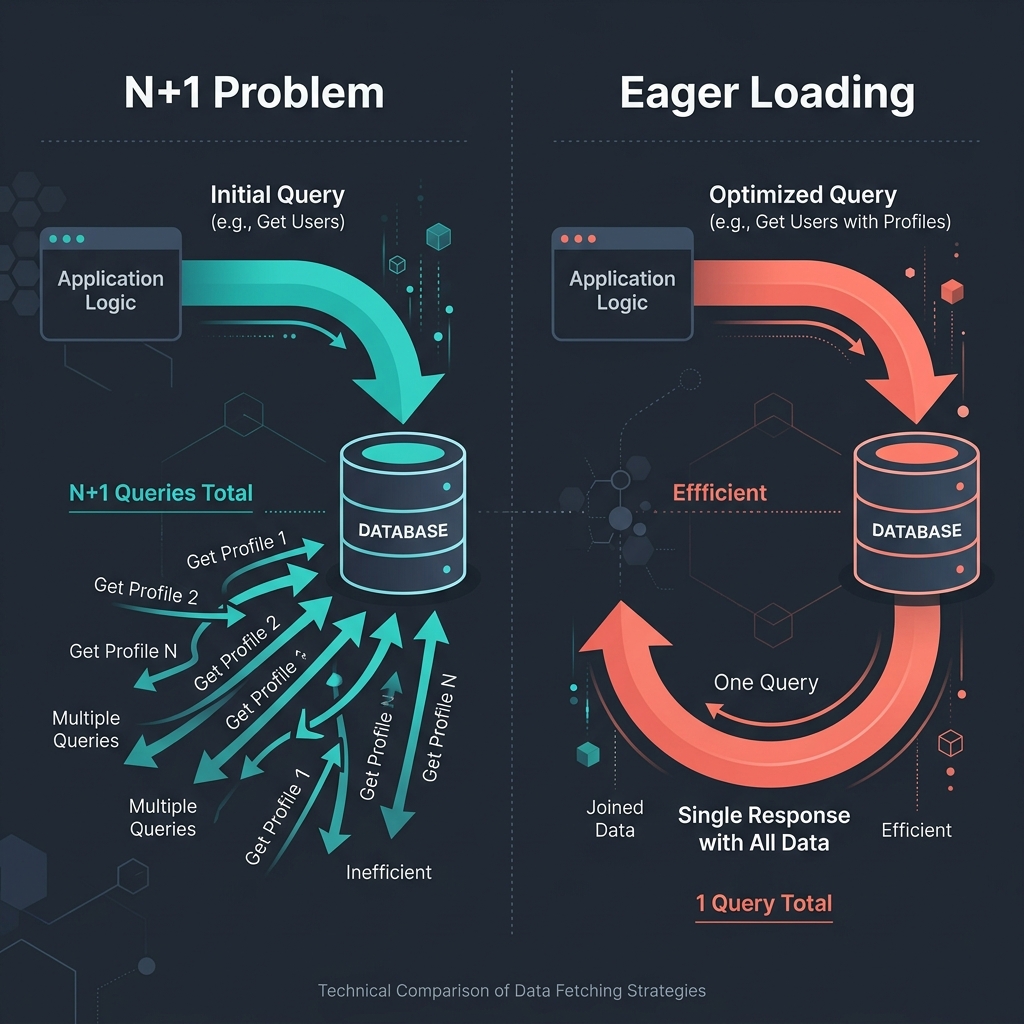
If you have 100 posts, this fires 101 queries: 1 for the posts, and 100 for each author. Have 1,000 posts? That’s 1,001 queries. Each one opens a connection, waits for a response, and comes back. The round trips add up fast.
Here’s what the query log looks like:
-- Query 1: Get all posts
SELECT * FROM posts;

-- Queries 2 through N+1: Get each author individually
SELECT * FROM users WHERE id = 1;
SELECT * FROM users WHERE id = 2;
SELECT * FROM users WHERE id = 3;
SELECT * FROM users WHERE id = 4;
-- ... 96 more of these
SELECT * FROM users WHERE id = 100;
One hundred and one queries for what is essentially a single question: “Give me the posts and who wrote them.”
Why ORMs Make This Easy to Miss
Here’s the tricky part. If you’re using an ORM (and most of us are), the N+1 problem is often invisible in your application code.
Take this Prisma example:
// Looks innocent
const posts = await prisma.post.findMany()

for (const post of posts) {
  const author = await prisma.user.findUnique({
    where: { id: post.authorId },
  })
  console.log(`${post.title} by ${author.name}`)
}
Or this Django equivalent:
# Also looks innocent
posts = Post.objects.all()

for post in posts:
    print(f"{post.title} by {post.author.name}")  # Triggers a query per post
The code looks perfectly clean. But under the hood, the SQL generated is a disaster. Every time you access post.author, the ORM fires a new query behind the scenes. It’s lazy loading doing exactly what it was designed to do — deferring database work until the data is actually accessed. The problem is, you’re accessing it in a loop.
ORMs make simple queries incredibly easy—but they make expensive mistakes even easier.
The Fix: Think in Sets, Not Loops
The solution is surprisingly simple once you see the problem. Instead of fetching related data one row at a time, you fetch it all at once.
1. Use a JOIN (SQL)
The most straightforward fix is to let the database do what it does best. Instead of querying twice, run a join:
-- One query. All the data.
SELECT posts.*, users.name AS author_name
FROM posts
JOIN users ON posts.author_id = users.id;
One query, one round trip. Done.
2. Eager Loading (ORM)
If you’re using an ORM, you don’t have to write raw SQL to fix this. You just need to tell the ORM to eagerly fetch the relationship.
For example, in Prisma (which is what powers this blog’s backend), you use the include option to bring in the related relation in the initial query:
// Eager load the author relation
const posts = await prisma.post.findMany({
  include: { author: true },
})

posts.forEach((post) => {
  console.log(`${post.title} by ${post.author.name}`)
})
This tells Prisma to fetch the posts and their corresponding authors in a single, highly optimized batch query instead of querying them row-by-row.
If you aren’t using Prisma, other ecosystems have their own ways to solve this. In Django, you’d use select_related('author') to force a SQL join, and in SQLAlchemy you’d use options(joinedload(Post.author)). Different syntax, same exact result under the hood: one query instead of N+1.
3. Batch Loading (and the DataLoader Pattern)
Sometimes a JOIN isn’t practical. Maybe your data is distributed across different microservices, or you’re building a GraphQL API where the resolver execution tree makes parent-child joins difficult to coordinate.
In those cases, you can use in-memory batching to collect the IDs and run a single lookup:
// Instead of N individual queries...
const authorIds = posts.map((post) => post.authorId)

// ...one batch query
const [authors] = await db.query('SELECT * FROM users WHERE id IN (?)', [authorIds])

// Map them back in memory
const authorMap = new Map(authors.map((a) => [a.id, a]))
posts.forEach((post) => {
  post.author = authorMap.get(post.authorId)
})
This trades N queries for 2 (one for posts, one for the batched authors).
While you can write this batching logic manually (as shown above), complex applications—especially GraphQL servers—often use a utility library like GraphQL’s DataLoader. Rather than forcing you to write batching boilerplate everywhere, DataLoader uses a deferred queuing mechanism (process.nextTick or microtasks in Node.js) to automatically intercept separate load requests across different parts of your execution graph and combine them into a single batch query behind the scenes.
How to Catch It Before It Catches You
The N+1 problem is sneaky because it scales silently. Ten records? You won’t notice. A thousand? You’ll feel it. Ten thousand? Your users will feel it — and they won’t tell you. They’ll just leave.
Here are some ways to catch it early:
- Query logging. Turn on query logging in development. If you see the same query repeating with different parameters, you’ve likely found an N+1. Most ORMs have this built in.
- Performance monitoring. Tools like Datadog, New Relic, or even a simple middleware that counts queries per request can surface the problem before it hits production.
- Linting / static analysis. Some ORMs and frameworks have plugins that warn you about potential N+1s. Django has
django-debug-toolbarandnplusone. Rails hasbullet. Use them. - Code review. Any time you see a database call inside a loop, pause. Ask yourself: can this be a single query instead?
The best performance fix is the one you make before your users notice the problem.
A Note on Over-Optimization
A quick reality check before you start rewriting every query in your codebase.
Not every N+1 is a crisis. If you’re only ever loading 5 records with 5 related items in a rare admin dashboard, the actual overhead is negligible. Optimization matters when it matters: at scale, on hot paths, in user-facing flows. Premature optimization is still a thing, and chasing every micro-inefficiency can lead you down a rabbit hole of complexity that makes your code harder to read and maintain.
The goal isn’t zero queries. The goal is intentional queries. Know what your code is doing. Understand the trade-offs. And optimize where it counts.
This is, at its core, a simplicity problem. The simplest solution — one query instead of a hundred — is also the most performant. That’s not a coincidence. Simplicity scales.
Takeaway
The N+1 query problem is one of those things that separates “it works” from “it works well.” It’s a reminder that performance isn’t just about the frontend or the server specs. Sometimes, the biggest wins come from understanding what your code is actually asking the database to do.
So the next time your app feels sluggish, before you reach for another caching layer or upgrade your server, take a look at your query log. You might find a waiter making a hundred trips to the kitchen when one would have been enough.
And if that waiter is your ORM? Don’t blame the waiter. Blame the instructions.